
Taxonomies
A taxonomy is a way to group content — categories, tags, authors, languages. Each taxonomy holds terms (the individual values), and each term can be attached to any number of content records.
Open Taxonomies in the sidebar to see the overview.
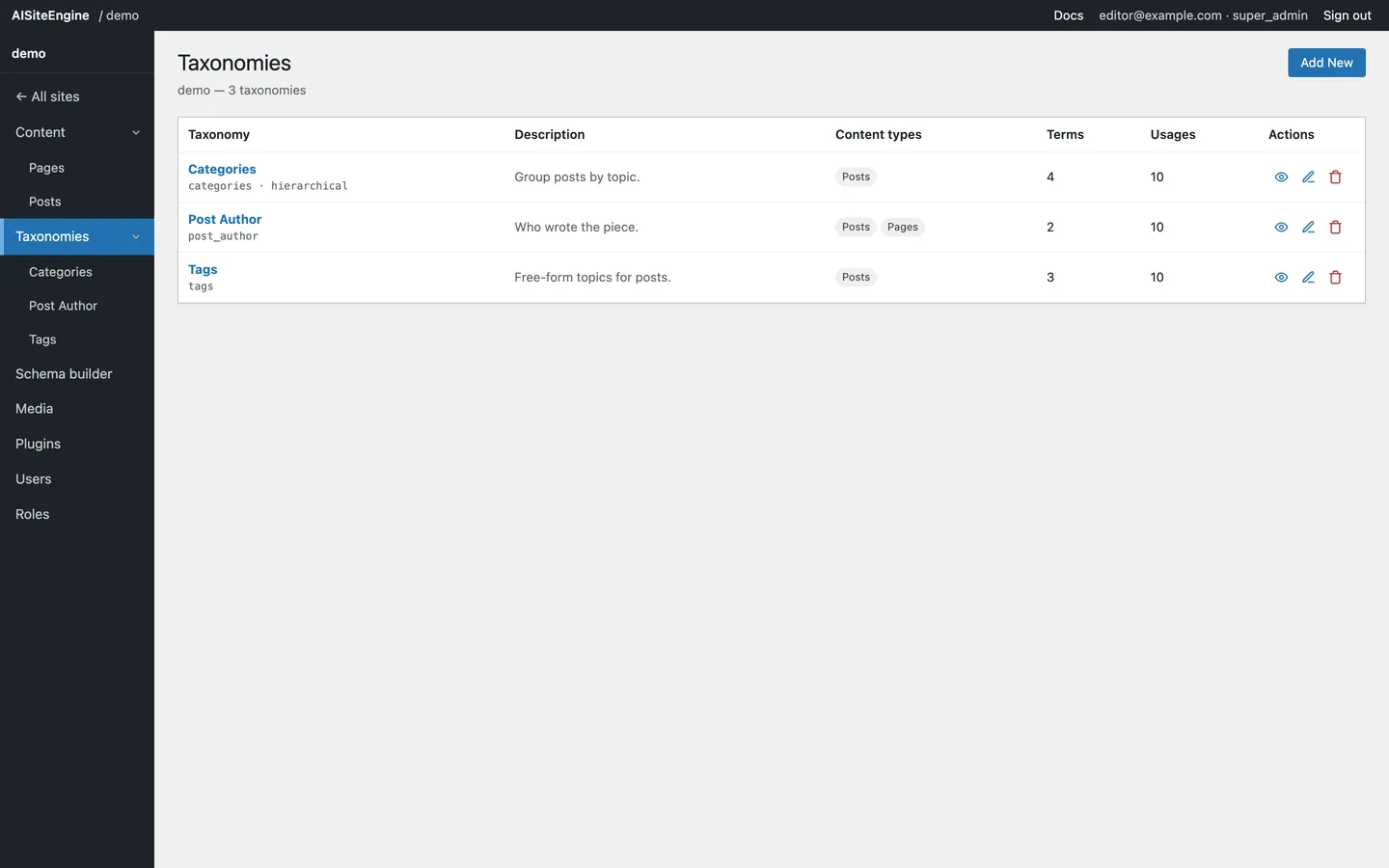
The overview table
Section titled “The overview table”| Column | Meaning |
|---|---|
| Taxonomy | Display label and the machine slug beneath it |
| Description | What the taxonomy is for |
| Content types | The content types it applies to, as chips |
| Terms | How many terms it has |
| Usages | How many content records reference any of its terms |
| Actions | View · Edit · Delete (icons, with tooltips) |
Hover an action icon to see its name.
Adding a taxonomy
Section titled “Adding a taxonomy”- Click Add New.
- Fill in:
- Name (slug) — the machine name, e.g.
categories. Lowercase, hyphens. - Label — what editors see, e.g.
Categories. - Hierarchical — tick for category-style parent/child terms.
- Description — optional, shown in the table.
- Content types it applies to — tick every type this taxonomy belongs to.
- Name (slug) — the machine name, e.g.
- Click Create taxonomy.
The new taxonomy appears in the table and in the sidebar immediately.
Editing a taxonomy
Section titled “Editing a taxonomy”Click the pencil icon on a row. You can change the label, hierarchy, description and content types.
The name (slug) is locked while editing: existing terms and content reference it, so renaming the machine name would orphan them.
Deleting a taxonomy
Section titled “Deleting a taxonomy”Click the trash icon. The confirmation tells you exactly what will be removed — how many term definitions and how many usages.
Deleting a taxonomy:
- removes the taxonomy itself,
- removes all of its term definitions,
- strips those terms from every content record that used them.
This cannot be undone.
Managing terms
Section titled “Managing terms”Click the eye icon (or the taxonomy name) to open it.
- Add New Term — name, slug, description.
- Edit (pencil) — renamed terms are updated inside every content record that uses them, so the counts stay truthful.
- Delete (trash) — removes the term definition and strips it from the content that used it.
The table shows Name, Slug, Description, Count (how many records use the term) and actions.
How taxonomies relate to content types
Section titled “How taxonomies relate to content types”Each taxonomy lists the content types it applies to. Most map one-to-one:
| Taxonomy | Content type |
|---|---|
| Categories | Posts |
| Tags | Posts |
| Topics | Guides |
Some are deliberately cross-type:
| Taxonomy | Applies to |
|---|---|
| Post Author | Posts, Pages |
| Language | Posts, Pages, Events |
When you create a taxonomy, choose the types it belongs to — that assignment is what tells editors where the taxonomy box should appear.